A real terminal
Not a toy emulator. A full PTY with tabs, scrollback, and every keybind your fingers already know. It feels like home on day one.
full PTY · tabs · scrollback PairAdminv2.8.1Get it
Open-source operator terminal
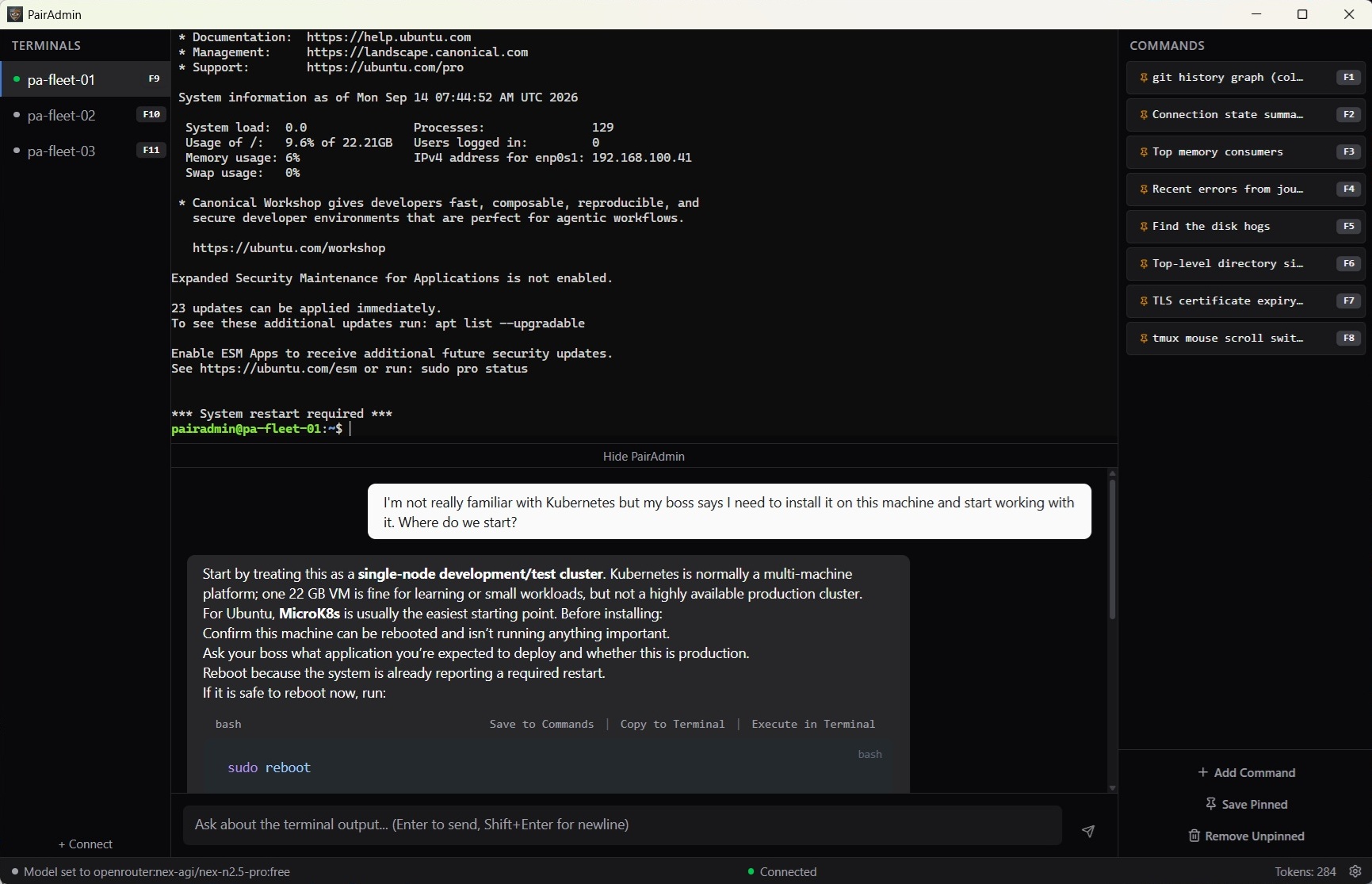
PairAdmin puts expert administration in front of a human operator without handing a model your credentials, your topology, or your shell. It reads the terminal you point it at. It recommends. You execute — or you don't.
All of the capability. None of the handover.
The comparison
Every operator is already making a choice — usually by accident. Here is the choice, made explicit.
| Bare terminal | Paste into a chatbot | Autonomous agent | PairAdmin | |
|---|---|---|---|---|
| Who executes | You, always | You — the model only reads what you paste | The agent, faster than you can read | You. The AI has no path to the shell. |
| What the model receives | Nothing | Whatever you selected and pasted | Your credentials, endpoints, a shell | System prompt + last N lines of the terminal you're looking at + your question. Nothing else. |
| Where it goes | Nowhere | A third-party endpoint, retention and training defaults you don't set | The agent's platform | Your configured provider — can be fully local. |
| Usable context | What you can see and remember | Only as wide as what you selected | Filesystem, credentials, topology | One tab, one question. |
| Time to a correct answer | Measured in years | Fast, but every paste is a judgment call | Fastest, but it acts faster than you read | The speed of the agent, the exposure of the terminal. |
| Record of what was sent | Nothing sent | Their history and retention | Their logs | A local rotating JSONL audit log — every prompt and response. |
| Blast radius of one bad suggestion | Your own typing | One command you run | Already ran — production | Nothing runs until you click Execute in Terminal. |
| Can be switched off | Always off | Don't open the tab | Disconnect it (and hope) | Disable Pair LLM — refused in the backend, amber Disabled. |
The three ways people work today
Books, forums, trial and error against production. Safe, and measured in years.
Fast, and every paste is a judgment call about what's in those lines — made in a hurry, against an endpoint whose retention and training defaults you don't set.
Genuinely effective, and it means giving a model your credentials, your internal endpoints, and a shell — then watching it act faster than you can read.
PairAdmin is the fourth option: the speed of the third, with the exposure profile of the first.
What the model is allowed to know
A request contains the system prompt, the last N lines of the terminal you are looking at, and what you typed. It does not contain your other sessions, earlier turns in this one, your filesystem, or your saved connections. Terminal content is read only when you press send — there is no ambient streaming, no background capture. Switch tabs and the assistant knows nothing about where you just were.
Before anything is sent, fifteen credential patterns are scrubbed in-process — plus any regexes you add yourself with /filter. The scrubbing happens before transmission, not after receipt.
And you can keep the whole thing on your own machine: point PairAdmin at Ollama or LM Studio and nothing crosses the network. Both default to loopback.
The off switch
Set the provider to Disable Pair LLM and no model is constructed and no endpoint is contacted. The request is refused in the backend — not hidden in the interface. The status bar reads Disabled for the entire session, in amber, not red: this is a chosen posture, not a fault.
It's the belt-and-suspenders for the moment you need to work against a system you will not reason about out loud.
Why PairAdmin
Built to make people start loving the terminal (or start loving it again). Four things it does better than anything you're running today — and one assistant that reads along the whole time.
Not a toy emulator. A full PTY with tabs, scrollback, and every keybind your fingers already know. It feels like home on day one.
full PTY · tabs · scrollbackDon't paste the error — Ask "why did that fail?" It sees the why at the same time as the question. Get an answer grounded in your actual shell history.
live context · no copy-pasteSSH and WinRM into every host from one pane. Saved hosts, saved sessions, zero context-switching between your boxes.
SSH · WinRM · saved hostsSave, name, and rerun the commands that matter. Your best incantations live one click away, forever.
save · name · rerunSee it in action
Real captures are landing here shortly.
No account. No trial.
Free and open source, Apache-2.0. Verify your download with install.sh --sha256.
Verify your download against the published checksums: SHA256SUMS